
Appearance
Navigating the Interface
Koel's interface is designed to feel instantly familiar if you've used Spotify, Apple Music, or any modern music player. Here's a quick tour.
The Sidebar
The left sidebar is your command center:
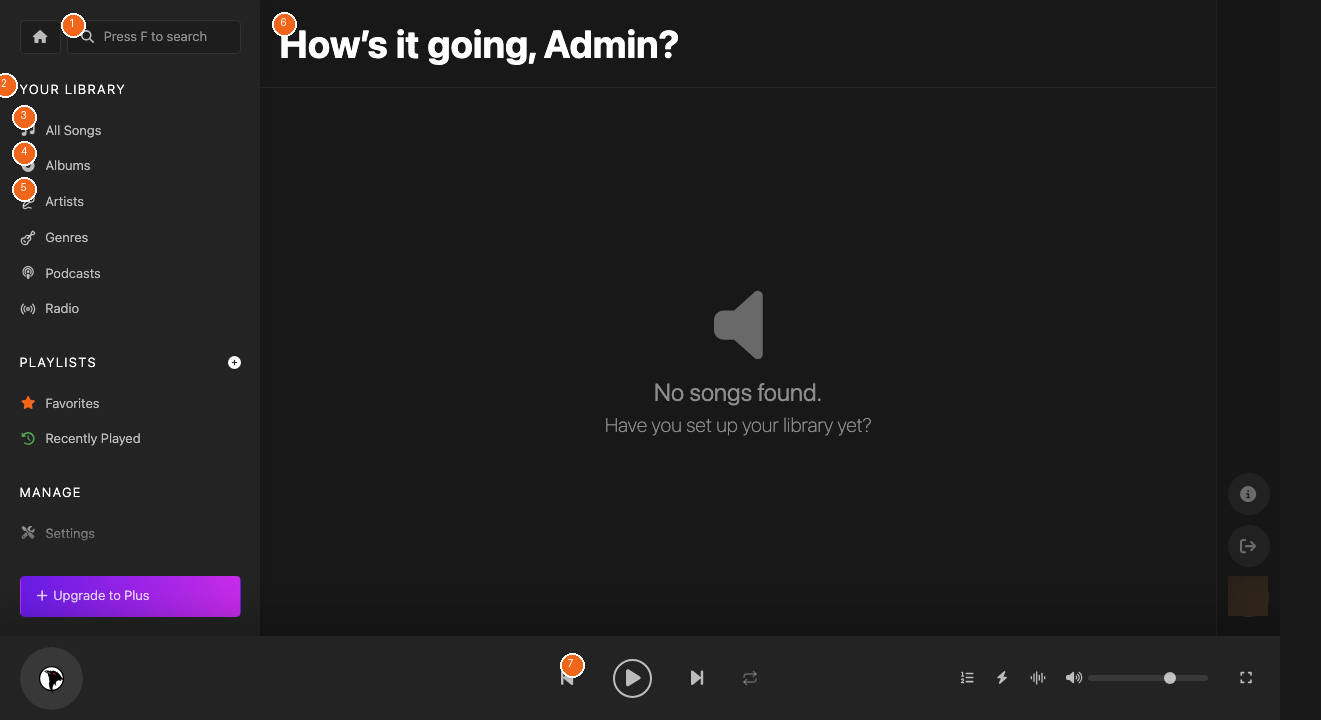
- Search [1] — Press
Fanywhere to jump to the search bar. Find songs, albums, and artists instantly. - Your Library [2] — Browse your collection by All Songs, Albums, Artists, Genres, Podcasts, or Radio.
- Playlists — Access your Favorites, Recently Played tracks, and custom playlists.
- Manage — Admin tools including Settings, Upload, and Users.
The Main Content Area
The center of the screen shows whatever you've selected — your home dashboard [6], song lists, album grids, or artist cards.
The Player Bar
The bottom bar [7] gives you full playback control:
- Previous / Play / Next — Standard transport controls
- Repeat & Shuffle — Toggle looping and random play
- Equalizer — Fine-tune your audio
- Visualizer — Eye candy while your music plays
- Volume — Adjust with the slider
- Full Screen — Expand for an immersive experience
Keyboard Shortcuts
Koel is keyboard-friendly:
Space— Play/PauseJ/K— Previous/Next trackF— Focus searchL— Like current song